Review Shopify Starter Plan: Everything you need to know
Shopify apps built by Avada Commerce are your all-in-one partner for ROI-focused growth, helping you optimize every stage on customer journey, from acquisition, conversion to retention. Our customer-centric premium support and growth optimization mindset ensure you not only maximize ROI but also build a sustainable and thriving business.
Shopify Starter is the ideal option for new businesses looking to begin selling online. For about $5 per month, you can set up a basic online store with all the tools you need to get started selling, such as: Product information, A page for getting in touch, Checkout on Shopify is quick and safe, A portable point of sale, Linkpop is a commercial link in bio tool, Shopify app access.
Shopify Starter is also an excellent tool for selling on social media. Linkpop allows you to establish a single link that directs clients to your Shopify product pages. This makes it simple to promote your products on social media and attract customers to your store.
What is the Shopify Starter Plan?
The Shopifi Starter Plan, also known as the Shopifi $5 Plan, is a Shopifi pricing plan that focuses on how to quickly and easily sell products online, without the need for complex tools, high prices, or even a website... That being said, it has the basic features of the Shopify plan, but lacks most of the advanced features.
For sellers new to e-commerce, the Starter Shopifi plan became the entry-level plan offered by Shopifi in June 2022, replacing the old Shopifi Lite plan. Although it shares almost the same features, the Shopifi Starter Plan starts at $5 per month, making it much cheaper than the Shopifi Lite plan ($9 per month).
What is the pricing of the Shopify Starter Plan?
Subscription charge for Shopify Starter Plan
The shopify website plan indicates a monthly cost of only $5. Shopify Starter will be available for $1 per month for the first three months beginning in November 2022.
You may also join up for a Shopify trial to see if Shopify Starter is perfect for your online store.
Shopify Starter transaction fees
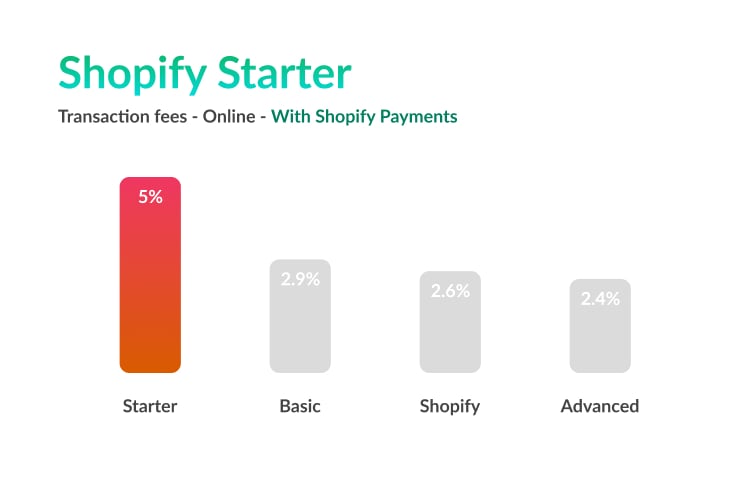
The Shopify Starter transaction fee is 5% + $0.30 per transaction (with Shopify Pay).

And for credit cards issued outside the United States, Shopify charges an additional 1% transaction fee.
Shopify Starter Plan Features
Reflexes The Shopify Starter Plan offers a number of key features that enhance your eCommerce experience.
Shopify Linkpop
The Linkpop site is versatile and customizable, hosting a variety of online content including social media links, business information, and images. Importantly, the Linkpop link can be embedded in your social media bio, at the top of your TikTok or Instagram profile, expanding the reach of your brand and increasing potential traffic. Additionally, there are several Shopify Starter Plan themes available for store owners to choose from to customize their online stores effectively.
Effective sales on social networks
Shopify's starter plan examples combine powerful payment processing with strict security measures that allow customers to make direct purchases from social media sites without having to visit your Shopify store. This streamlined process builds trust among customers and significantly improves conversion rates.
Sales analysis and order management.
The Analytics feature allows you to monitor key metrics, including total sales, detailed sales breakdown, best-selling products, and order history. Provides flexibility to compare recent sales values with a previous time period, evaluate the effectiveness of different sales channels, and track your average order value.
Metrics are presented in a user-friendly format with numerical values and visually appealing graphs, ensuring easy interpretation. Additionally, you can see the percentage change from the previous date range for all metrics, helping you better understand the progress of your business.
Customer service
Although phone call support is not available with the Shopify Starter plan, it provides alternative communication channels, such as live chat and email support, to effectively engage with merchants. These channels ensure that distributors get quick help and support for their queries and concerns.
Similar to other Shopify plans The Shopify Starter Plan includes:
Unlimited Items – You can sell as many products as you want on your Shopify store.
Post Limit: There is no limit to the number of web visitors or files that can be placed on your store.
Brand Assets: You can add and manage your logo, colors and branding.
Fraud investigation: Shopify Payments is under fraud investigation. To help you avoid overpayments and losses, this section flags orders that may be fraudulent. Create
Orders Manually: Your Shopify admin allows you to create new orders and add payment information.
Discount Codes – Increase your sales easily with discount codes.
Abandoned cart returns: If a customer leaves your store without completing the checkout process, there are junk cart returns to email you. You can customize the email sent to customers who leave your store.
Analytics: The Analytics page is available at all stages of planning and displays sales, orders and visitor information for your online store.
Financial Reports: These reports provide important financial information about your business. You can see sales, payments and pending sales in your financial summary, and you can also view full financial statements for more information.
Customer Support: Call, email, or chat with Shopify's support team if you need help setting up your store.
How to Set Up an Online Store with Shopify Starter Plan?
Add a Product

To begin selling using Shopify Starter, you must first add products to your Shopify store.
To create and change your product details, go to Products in your Shopify Admin Panel.

You will need to provide the following:
Product Title
Product Description
Product Media (images, videos, or 3D previews)
Pricing
SKU (Stock keeping unit)
Product options/variants
After that, click Save and the newly added product is ready for the next step.
Your Linkpop page
What is Linkpop?
Linkpop, powered by Shopify, offers a free tool for creating sales landing pages that can attract traffic from social media platforms. Linkpop is similar to Linktr.ee, Shor.by or Tap.bio, with added e-commerce features.
Create your Bio landing page with Linkpop
Click on Linkpop in your Shopify Admin Panel.

Linkpop acts as one of the sales channels and can be managed like Shopify apps. You may need to grant Linkpop permission to install and access the repository.
Click the Create page to edit your Linkpop profile.

After that, modify your website URL, page image, profile name, and profile description. Remember, you can always go back and edit this information if you want.
When you click the Create Profile button, your Linkpop page will be live. However, we still need to add products to Linkpop.
Add a product to your Linkpop profile
Then, click on Add product and choose the products you want to add.
In this case, I will add the demo product: a Shopify T-shirt!

Here is an example of how the Linkpop page will look after adding one product.

However, you may add an endless number of products (with limitless product pages) and they will stack vertically.
Social selling with your Linkpop profile

To begin social selling with Shopify Starter, the first step is to drive visitors from social media sites to your Linkpop. Here are some suggestions you may put into action right away:
Bio link
You can only post one URL in your bio for social media platforms like Instagram or Tiktok, which is a standard practice for many social retailers.

When a fan views their profiles, they will see a call-to-action to follow the page or click on their bio link. This is where Linkpop shines!
You can use Linkpop to redirect your profile visitors to your product pages and assist them in browsing through your listed products.
At this point, you might want to monitor the following metrics:
Your profile viewers: Almost every social media site (in their business modes/plans) includes this measure.
Your Linkpop visits: Shopify monitors the traffic to your Linkpop profile.
A simple conversion rate can be calculated with the following:

Link in Bio conversion rate = (Number of Profile visitors / Number of Linkpop visitors)%
The higher the conversion rate, the better! This conversion rate will help you optimize your bio text (along with bio length, wording, and emoticons). But how do you know if your bio link is on point?
According to flick.tech, with their survey of 54k Instagram accounts, you should consider 4% conversion as your goal.
Social Post
Some social networking services, such as Instagram, may not allow you to connect URLs to your post. However, you can leverage features like Instagram stories to highlight your products with link stickers.

Another Instagram best practice is to cite "Link in bio" at the conclusion of your post caption. This will take your fans back to your profile, where they may view your Linkpop page.
Upgrade to other Shopify plans
With the Shopify Starter Plan Demo you can upgrade to a higher plan with advanced features while always saving your products and customer data.
Thank you for reading